
When enabled, Miles can respond to customer text messages, answer incoming phone calls, and assist with scheduling and managing appointments—so your team can stay focused on servicing vehicles while customers still receive timely, consistent support.
This article summarizes what Miles can and cannot do, and how it interacts with your customers.
1. Appointment Scheduling
Miles works directly with your Retention Pro Appointment Settings to help customers book and manage visits:
- Book new appointments
- Uses customer information to clarify which vehicle they are bringing in
- Gives available times based on your Scheduler settings (hours, lead time, time intervals)
- Offers available services from your Services settings, including default durations
- Confirms drop‑off / wait / ride / loaner options when enabled
- Uses your “Auto‑confirm all new incoming appointment requests” setting to decide whether appointments are created as Pending or Confirmed
- Reschedule and cancel appointments
- Helps customers reschedule an existing appointment to a new time
- Cancel appointments when requested
For more information on how Miles works with appointments, see:
How Does The Miles Virtual Service Agent Schedule Appointments?
2. Text Messaging Communication
When enabled for text, Miles can:
- Respond to inbound customer texts
- Handles customer replies to campaigns
- Recognizes when a customer wants to schedule, reschedule, or cancel
- Answer common questions using your settings
- Business hours, phone number, address, and holiday closures (from Company & Holiday Settings)
- Respond in context
- Recognizes which campaign a customer is replying to
- Remembers the conversation for up to 30 minutes and then starts fresh after 30 minutes of inactivity.
- Handles messages that include both questions and scheduling info
- Example: “What are your hours? Also I need an oil change on Thursday” → Miles briefly answers the hours question and then continues to collect appointment details.
- Only responds when appropriate
- Does not reply to simple acknowledgements such as “Ok”, “Thanks”, or “Got it”
- Ignores reaction‑style messages like: "Liked "Your appointment is confirmed"" but still notifies of the engagement in the Message Center
For more on how Miles handles conversations see: How Does Miles Interact With Customers?
3. Phone Calls
When enabled for voice, Miles can answer incoming calls and turn your phone line into a service tool:
- Customer service on calls
- Resolves simple, common inquiries
- Can reference customer and appointment information where available
- Appointment scheduling by phone
- Lets customers book, modify, or cancel appointments via natural conversation
- Follows the same availability, services, and capacity rules as text booking
- Business information
- Provides hours, services, and general shop information based on your configuration
- Uses your “Operating Hours Display” text to clearly explain when you’re open
- Intelligent routing
- Transfers calls to your team when a question or situation is too complex
- Avoids transferring obvious spam or robocalls by listening for phrases that indicate the caller wants a real person (e.g., “I need to speak with someone at the shop”)
More details here:
What Does The Miles Virtual Service Agent Do When Answering Phone Calls?
4. What Miles Will Not Do
- No pricing information or payments
- Does not quote prices for parts/service or accept payments
- For pricing questions (e.g., “How much is an oil change?”), Miles suggests the customer call the shop
- No vehicle diagnostics
- Does not diagnose vehicle problems
- Acknowledges the concern with empathy and encourages the customer to call or schedule a visit
- Limited data access
- Does not view customer information beyond what’s needed for appointments and related communication
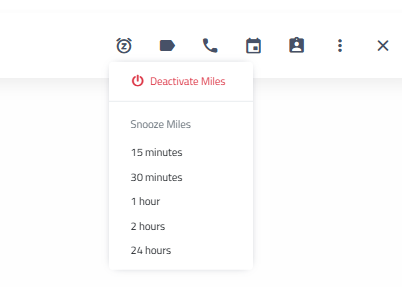
To "pause" or "snooze" the Miles Virtual Service Advisor so that you manually respond to and have a conversation with a customer you can use the snooze options at the top of that conversation in the Message Center.

Click the clock icon with the Z in the center to choose how long to snooze Miles replies to that customer. This will allow you to handle the conversation with the customer yourself without having to fully disable the Miles Virtual Service Advisor for all conversations.
Configuration and Customization
For step‑by‑step configuration guidance:
Configurations and Settings for the Miles Virtual Service Advisor
To learn how to enable Miles in Retention Pro:
Enabling the Miles Virtual Service Advisor