
In Retention Pro, the Miles AI Subscriptions report helps you manage which customers are currently subscribed or unsubscribed to Miles AI communications. For more on unsubscribing customers from Miles communications please see How Do I Prevent a Customer From Receiving Miles Virtual Service Advisor Messages?
Navigating to the Miles AI Subscriptions Report
- Click on Analytics at the top of your Retention Pro screen
- Select Customers from the left side menu
- Scroll down and click on the tile that says Miles AI Subscriptions
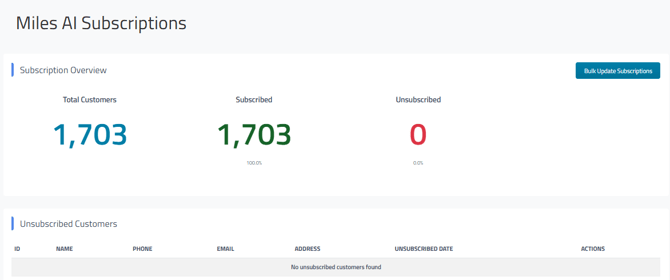
When the report is open you will see your total customer count, how many of your customers are subscribed (or available) for Miles AI Communications, and how many are unsubscribed from Miles AI Communications.
Below the customer counts, you’ll see a list of unsubscribed customers along with the date they were unsubscribed. In the Actions column, a View Details button appears next to each unsubscribed customer; selecting this opens their customer profile in Retention Pro.
Bulk Update Subscriptions
At the top of the report you will see a button that says Bulk Update Subscriptions, if you click on this a pop-up window will open:
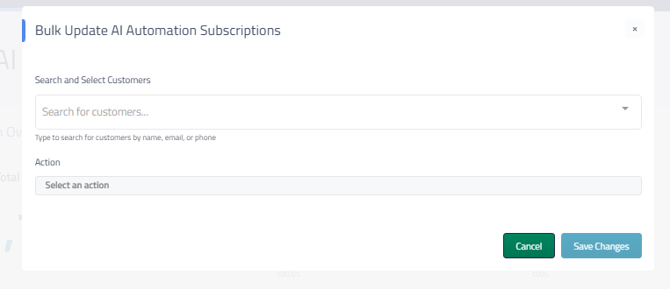
Using the Search and Select Customers box you can enter a customer (or multiple customers) to select them from your database. If you select the wrong customer you can use an X next to their name to remove them.
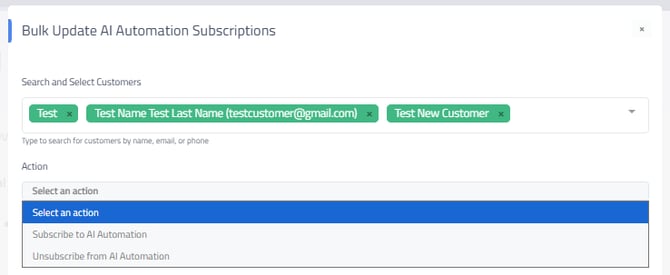
In the Action drop down you can select either Subscribe to AI Automation or Unsubscribe from AI Automation depending on the action you would like the system to perform.
Once you have both boxes filled in click on Save Changes to perform the bulk update. If you have unsubscribed those customers you will see them populate in the Unsubscribed Customers list on the Miles AI Subscriptions report.