
Each text campaign includes a Basic Filters section that helps you narrow down which customers will receive the campaign.
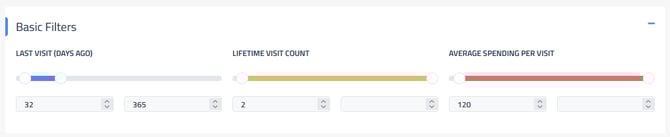

Last Visit
Limit how long it's been since the customer's last visit to the shop. Consider if you want it sent to anyone who has been in for work recently or if you don’t want it sent to customers who haven’t been in a long time.
Lifetime Visit Count:
Set how many times a customer should have visited before receiving the campaign, this can be useful in helping to omit customers that may have only been in once from a more targeted campaign to reach your best customers.
Average Spending Per Visit:
Set a minimum and/or maximum average spend per customer to determine who is included in the campaign. This is the average across all repair orders for the customer. For example, if a customer comes in for a $300 repair and then again for a $40 oil change then their average spending per visit would be $170.
For more details please see Text Message Campaign Basic and Additional Filters
Also see Text Campaigns