
When you’re on the Edit screen of a continuous text campaign, you’ll see options for Alternative Messages. These are used when a customer has already received that campaign before, helping you avoid sending the exact same message again so your communication feels more personal and less repetitive.
Let's say your customer Jane Smith is a repeat customer. She received an After Visit Follow Up when she was in for her oil change 5 months ago but she just came back in for another oil change and to get her A/C checked. Instead of her receiving the same text message she received after her last visit she would get the second message listed. If it was her third visit she would get the third message.
After a customer has received all Alternative Versions the system will loop them back to the first message and start going through the Alternative Versions again.
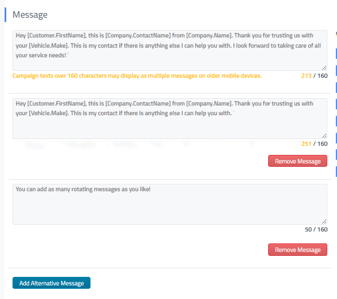
To add a new Alternative Message you would click on the blue Add Alternative Message button at the bottom of the message entry fields.
You can remove an Alternative Message at any time by clicking on the red Remove Message button below that message entry field.